Choosing a USB podcast mic is harder than it looks. Most of these mics plug straight into a computer, so the real question is what each one does beyond that. The picks below split on how they capture your voice, what extras they include, and how much setup you want to do. We look at each mic’s own listing and nothing else.
Best overall: Shure MV7 USB, because its listing pairs a dynamic capsule with onboard processing and both USB and XLR outputs, so it grows with you.
Best for first-timers: Sennheiser Profile USB, because the listing stresses one simple connection and a dial to control your sound without software.
Best for hands-on tweakers: Logitech Blue Yeti, because its listing shows four pickup patterns and onboard controls for mute, gain and headphone volume.
This guide is for anyone shopping for a USB podcast mic who wants to know which differences really matter.
How We Picked
We compared 48 Amazon listings and kept the mics whose own product pages state useful facts. Those facts include what is in the box, the connections offered, monitoring options and the features that shape how a mic sounds. A listing that gave too little to judge was set aside, and the ones that remain are the ones where the seller gave us something to compare.
Listings matter because they’re the only evidence we had. We didn’t test these microphones in a room, so we judged only on what each seller states and left out anything a listing didn’t say. That keeps the comparison honest, but it also means a mic’s real performance may differ from what its page suggests.
Some listings gave only a product name and nothing else. Those were set aside rather than guessed at, since a name alone doesn’t tell you the connection type, the pickup pattern or whether the mic has a headphone jack. If you see a mic we left out, check its full listing before ruling it out.
Comparison Table
All 10 products side by side — scroll sideways to see every column.
| Top Pick | Best for Flexible Modes | Best for Home Studios | Best for Broadcast Sound | Best for Beginners | Best for Gamers | Best for Boom Arms | Best for Noise Cancelling | Best for Untreated Rooms | ||
| Preview |  |  | 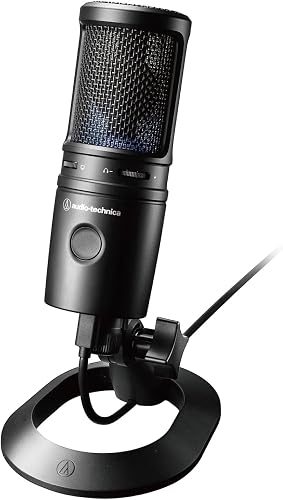 |  |  | 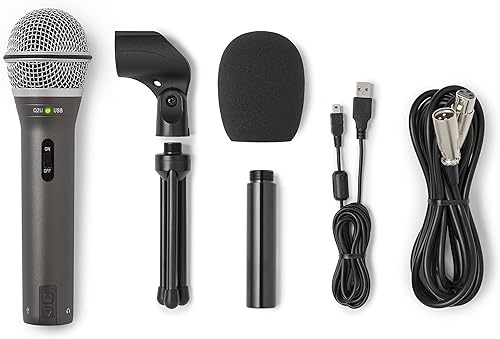 | 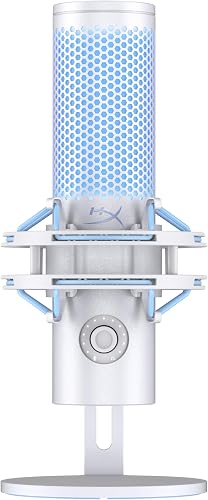 | 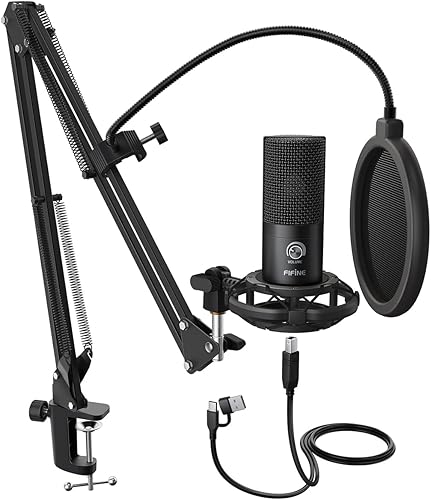 |  |  |
|---|---|---|---|---|---|---|---|---|---|---|
| Product | Shure MV7 USB | Logitech Blue Yeti | Audio-Technica AT2020USB-X | RØDE PodMic USB | Sennheiser Profile USB | Samson Q2U | HyperX QuadCast 2 | FIFINE T669 | NEEWER DM04 | MAONO HD300T |
| Brand | Shure | Logitech G | Audio-Technica | Rode | Sennheiser | SAMSON | HyperX | FIFINE | NEEWER | MAONO |
| Best for | Best Overall | Best for Flexible Modes | Best for Home Studios | Best for Broadcast Sound | Best for Beginners | — | Best for Gamers | Best for Boom Arms | Best for Noise Cancelling | Best for Untreated Rooms |
| The listing says | USB dynamic microphone with onboard DSP XLR output in black | Three-capsule array for broadcast-quality USB sound Blue VO!CE software with effects and modulation | Extended frequency response for podcasts and voiceover Built-in headphone jack for direct monitoring | XLR and USB-C connections built in On-board APHEX DSP with compression, adjusted via free app | Single connection for plug-and-play setup Natural, warm sound that emphasises the human voice | Dynamic handheld microphone with XLR and USB-C Connects directly to USB-C computers | HyperX QuadCast 2 Frost | USB plug-and-play, no extra hardware or drivers Wide frequency response, handles high SPL | USB-C or XLR connection for phones, PCs and consoles 29mm moving coil, cardioid, 192kHz/24-bit sampling | USB or XLR dynamic microphone, switchable modes Cardioid dynamic capsule reduces background noise |
| More information | Price on Amazon | Price on Amazon | Price on Amazon | Price on Amazon | Price on Amazon | Price on Amazon | Price on Amazon | Price on Amazon | Price on Amazon | Price on Amazon |
1. Shure MV7 USB Podcast Microphone
Best for: Podcasters who may later move to an XLR setup.
The listing describes a USB dynamic microphone with onboard DSP and a separate XLR output, so the same mic can work on a computer today and in a studio later. The headphone output and adjustable gain give you control over monitoring and levels. For a podcaster who wants room to grow, that flexibility is the main reason to choose it.
The listing describes a dynamic USB microphone; it doesn’t say how the mic handles loud rooms or close speaking. The onboard processing does some of the work a separate interface would do. That means less to set up, though you give up the finer control of a full audio chain. The Blue Yeti is the better pick if you want the most pattern options in a single USB mic.
Pros
- Both USB and XLR outputs
- Built-in headphone output for monitoring
- Adjustable gain control
- Onboard DSP processing
Cons
- Listing shows an XLR output, so using it through a standard USB port needs a separate interface or mixer setup.
2. Logitech Creators Blue Yeti USB Microphone
Best for: Shoppers who want flexible recording modes in one USB mic.
The listing describes a three-capsule array with four pickup patterns: cardioid, omni, bidirectional and stereo. Each pattern changes which direction the mic listens to, so one mic can handle a solo podcast, an interview with a second speaker or a music session. Onboard controls for headphone volume, pattern selection, mute and gain sit right on the mic, so you rarely need to dig into software.
Having four patterns in a single mic is useful if your recordings change from week to week. A fixed cardioid mic like the Sennheiser Profile is simpler, but it won’t capture two people across a table the same way. The Blue Yeti asks you to think a little more about pattern choice, which is the trade-off for that range.
Pros
- Four pickup patterns in one mic
- Onboard controls for mute, gain and headphone volume
- Adjustable desktop stand included
- Plug and play on Mac or PC
Cons
- Listing says four pickup patterns, but the stand only covers desktop use, so a boom arm is needed for other positions.
3. Audio-Technica AT2020USB-X Cardioid Condenser USB Microphone
Best for: Home studio users who want a clean, detailed voice sound.
The listing describes a smooth, extended frequency response and a 24-bit, 96 kHz converter. Those numbers point to detailed recording, which suits voiceover and narration work. A soft-touch mute button and a two-state LED ring show mute status at a glance. The directional pickup is meant to cut background noise.
A condenser mic like this one captures more detail than a dynamic, but it also picks up more of the room. That makes it a fit for a treated space and a poorer one for a noisy kitchen or shared office. The RØDE PodMic USB is the better choice if your room isn’t ideal, because its broadcast dynamic capsule rejects more of the surroundings.
Pros
- High-resolution 24-bit, 96 kHz converter
- Built-in headphone jack for direct monitoring
- Soft-touch mute with LED status ring
- Includes a custom desk stand
Cons
- Condenser design picks up more of the room
4. RØDE PodMic USB
Best for: Creators who want broadcast sound and the option of an XLR connection.
The listing describes both XLR and USB-C connections built into one mic, so you can plug it into a laptop or an interface. On-board APHEX DSP adds compression and presence over USB, and a free app lets you adjust it. The broadcast dynamic capsule is described as rejecting keyboard noise and room echo, which matters if you record at a desk with a keyboard close by.
Zero-latency monitoring through the headphone jack means you hear your own voice with no delay. That’s a real benefit when you record and talk at the same time. The Samson Q2U offers a similar XLR and USB pairing, but the PodMic USB adds the processing that the Q2U doesn’t describe.
Pros
- Both XLR and USB-C connections built in
- On-board DSP with compression and presence
- Zero-latency headphone monitoring
- Works on Mac, PC, iPad and Android
Cons
- The processing is controlled through a separate app
5. Sennheiser Profile USB
Best for: Beginners who want the simplest setup.
The listing focuses on plug-and-play simplicity: a single USB-C connection and a dial that controls your sound without software. The mic includes a table stand and a mute button, and the listing describes a warm, natural voice tone. A metal housing and a German-engineered cardioid capsule are part of the build description.
Controlling your sound with a dial rather than a menu suits anyone who wants to set levels quickly. The trade-off is that the listing offers fewer pattern choices than the Blue Yeti, so this mic is most useful for solo speaking. If you want a single mic for both solo and group recording, the Blue Yeti fits that need better.
Pros
- One-connection plug-and-play setup
- Dial control for sound without software
- Built-in mute button and headphone jack
- Metal housing with a table stand
Cons
- Offers one pickup pattern, suited to solo speaking
6. Samson Q2U USB/XLR Dynamic Microphone Recording and Podcasting Pack
Best for: Buyers who want a complete starter bundle with XLR and USB.
The listing describes a dynamic handheld mic with both XLR and USB-C outputs. It comes with a tripod desktop stand, a tripod extension, a mic clip, a windscreen, a USB-C cable and an XLR cable. That’s a lot of accessories in one box, which means you can start recording without buying extras.
The USB-C output means you can plug the Q2U straight into any computer with a USB-C port, with no separate audio interface needed for a first setup. The XLR output is there for later, if you move to a mixer or an interface. Because both connections are in the box, you aren’t forced to choose one path on day one.
The Q2U is a dynamic mic, so it handles loud sources and close speaking well. That makes them a practical choice for untreated spaces, though the listing itself doesn’t make any claim about room noise.
If you want processing built in, the PodMic is the better fit. If you prefer to handle processing in your recording software, the Q2U leaves that choice entirely to you.
Pros
- Both XLR and USB-C outputs
- Full set of stands and cables included
- Windscreen and mic clip in the box
Cons
- Listing says it plugs directly into any computer with a USB-C interface, so older USB-A only computers are left out.
7. HyperX Quadcast 2 Frost
Best for: Gamers and streamers who want lighting and easy desk controls.
The listing is short and names the HyperX QuadCast 2 Frost with a removable shock mount and on-board controls. Its key selling points are the LED lighting and the controls built into the body. Those controls suit anyone who likes to change settings during a stream without opening a menu.
Because the mic sits on your desk, the controls are easy to reach mid-session. You can adjust settings without breaking your rhythm or switching windows, which is the practical advantage over a mic that relies only on software.
The shock mount matters too. It isolates the capsule from knocks and vibrations traveling through the desk, so typing, mouse clicks and bumps are less likely to reach your recording. The listing says the mount is removable, so you can swap it out or use the mic on a different stand if your setup calls for it.
The listing gives little detail on the capsule or pickup pattern, so we can’t say how it compares on voice quality. If lighting and convenient controls matter more to you than detailed specs, it’s worth a look.
If you record in a room with a lot of echo, a mic with more documented detail may serve you better. For a clearer account of sound, the Audio-Technica AT2020USB-X lists more information.
Pros
- Removable shock mount included
- On-board controls for quick changes
- LED lighting built into the design
Cons
- The listing gives few technical details
8. FIFINE T669 Studio Condenser USB Microphone
Best for: Buyers who want a studio condenser kit with a boom arm.
The listing describes a plug-and-play USB condenser with a cardioid capsule, a boom scissor arm, a shock mount, a double pop filter and an 8.2-foot USB cable. The arm can reach 30 inches, so the mic can sit out of your sightline. The listing also says it needs no drivers, so you connect it to a PC or laptop and start recording.
The cardioid capsule is described as capturing sound from the front and avoiding ambient noise. That only works if you aim the mic correctly, so place the capsule facing your mouth and keep the pop filter between you and the mic.
A condenser mic like this one picks up detail but also the room, so a quiet space helps. Hard surfaces such as bare walls and hard desks bounce sound back into the capsule and make your voice sound hollow. Soft furnishings, a rug or a closet full of clothes will do more for your recordings than extra gear will.
The boom arm is a real plus if you want the mic off the desk. The shock mount isolates the capsule from knocks on the desk and arm, which is useful if you type or move around while recording. The Samson Q2U offers a dynamic alternative with fewer parts to assemble.
Pros
- Boom arm reaches 30 inches
- Shock mount and double pop filter included
- Plug and play with no drivers needed
Cons
- Condenser design picks up more room sound
9. NEEWER DM04 USB + XLR RGB Dynamic Microphone with AI
Best for: Users who want noise cancellation and an app for control.
The listing describes both USB-C and XLR connections, plus AI noise cancellation that removes keyboard and fan noise. A companion app for Windows, Mac, Android and iOS adjusts gain, mute, EQ and noise cancellation. RGB lighting shows the mic’s status, and a headphone jack gives real-time monitoring.
The noise cancellation is the main reason to pick this mic over a plain dynamic. The trade-off is that you rely on the app for many settings, so setup takes a little more time than the Sennheiser Profile. The MAONO HD300T also offers USB and XLR, but its listing focuses more on the desktop kit than on app control.
The RGB colors are a quick way to check the mic without looking at a screen. Blue means normal operation, green means noise cancellation is active, and red means the mic is muted. If you stream or record with a camera pointed at you, that light tells you your mute state at a glance.
The headphone jack is worth using from the start. It lets you hear your volume, clarity and background noise as you record, so you can catch a problem before a session is finished. The mute button and the mic gain and headphone volume dials cover the most common adjustments without opening the app.
Pros
- USB-C and XLR connections together
- AI noise cancellation removes keyboard and fan noise
- Companion app controls many settings
- RGB status lighting
Cons
- Many settings depend on the app
10. MAONO HD300T USB XLR Dynamic Podcast Microphone
Best for: Users who record in an untreated room and want a complete kit.
The listing describes a cardioid dynamic capsule that’s designed to reduce background noise and room reflections. It comes with a metal desktop stand, a shock mount, a pop filter, a USB cable and an XLR cable. Zero-latency monitoring through the headphone jack is included in USB mode.
The listing describes a cardioid dynamic capsule that is designed to reduce background noise and room reflections.
The capsule’s pickup pattern also matters for where you sit. Speak straight into the front of the mic, with the pop filter between your mouth and the capsule, and keep your head at a consistent distance. Moving off-axis changes the tone more than with a closer-miked setup.
It works for podcasts, voiceovers and singing. The RØDE PodMic USB offers more onboard processing, while the HD300T offers a fuller accessory kit in one box.
If you plan to record in a room with hard surfaces and you find the sound boomy, adding soft furnishings nearby will help more than any setting on the mic.
Pros
- Dynamic capsule suits untreated rooms
- Complete kit with stand, shock mount and pop filter
- Zero-latency headphone monitoring in USB mode
Cons
- Listing says XLR mode works with an audio interface or mixer, so an XLR-only setup without one is left out.
How to Choose in Sixty Seconds
Decide between USB only and USB plus XLR
If you may move to an audio interface or mixer later, look for a mic with an XLR output. The Shure MV7 USB, RØDE PodMic USB, Samson Q2U and NEEWER DM04 all list XLR. If you only plan to use a laptop, a USB-only mic is simpler to set up.
Decide how much your room will affect the sound
A condenser mic such as the Audio-Technica AT2020USB-X or the FIFINE T669 gives more detail but needs a calmer room. Check your space before you choose.
Decide whether you want controls on the mic or in software
Mics like the Sennheiser Profile and the Blue Yeti put controls on the body, so you can change levels without opening an app. The NEEWER DM04 and RØDE PodMic USB rely more on software. Pick the style that matches how often you want to adjust things mid-recording.
Related guides
- Best Leadership Podcasts for Startup Founders
- 10 Best Tools for Weeding Gardens to Clear Your Flower Beds
Frequently Asked Questions
Do I need an audio interface with a USB podcast mic?
No. A USB mic plugs straight into a computer and needs no separate interface. The mics that list an XLR output, such as the Shure MV7 USB and RØDE PodMic USB, can also connect to an interface if you want one later. Because USB mics handle conversion internally, most beginners can start without extra hardware. An interface becomes useful when you add more microphones or want finer control over gain and monitoring.
Is a dynamic or condenser mic better for podcasting?
It depends on your room. Dynamic mics such as the RØDE PodMic USB and MAONO HD300T capture less of the surroundings, which helps in untreated spaces. Condenser mics such as the Audio-Technica AT2020USB-X and FIFINE T669 capture more detail but also more of the room. If your space is quiet, a condenser can sound very clear. If there’s echo or background noise, a dynamic is usually the safer pick.
What does the headphone jack on a USB mic do?
It lets you hear your own voice while you record, a feature called monitoring. Several listings, including the RØDE PodMic USB and MAONO HD300T, describe zero-latency monitoring, which means you hear yourself with no delay. That helps you catch problems in real time. Without monitoring, you would only hear the mistake after recording. Most mics on this list include a headphone output, so check for it if you plan to record and talk at the same time.
Can one USB mic handle both solo podcasts and interviews?
Yes, if it offers more than one pickup pattern. The Logitech Blue Yeti lists four patterns, including cardioid, omni, bidirectional and stereo, so it can cover solo and two-person setups. A single-pattern mic such as the Sennheiser Profile is best for solo speaking. If you record interviews often, choose a mic with pattern options so you can change how it listens without buying a second mic.
Closing
If you want one mic that works now and later, the Shure MV7 USB is a solid all-round pick. Its USB and XLR outputs mean you can start plugged straight into a laptop and move to an audio interface when your setup grows, without buying a new microphone.
The Logitech Blue Yeti is the choice if you want several pickup patterns in one USB mic. It also gives you onboard controls for headphone volume, pattern selection, instant mute and mic gain, so you can adjust levels without opening software.
The two mics suit different habits. If you mostly record yourself alone at a desk, the MV7 keeps things simple and leaves room to grow. If you record different kinds of sound or like adjusting the mic by hand, the Blue Yeti gives you more options in a single USB unit.
Start by listing your room, your connections and how much you want to adjust on the mic itself, then compare the two that fit best.